Podkeeper · A2 Digital Products
Pods that turn themselves off.
Launches a GPU pod when there's work, kills it when the queue empties, watches your balance, texts your phone. No more paying for a pod that sat idle all night.
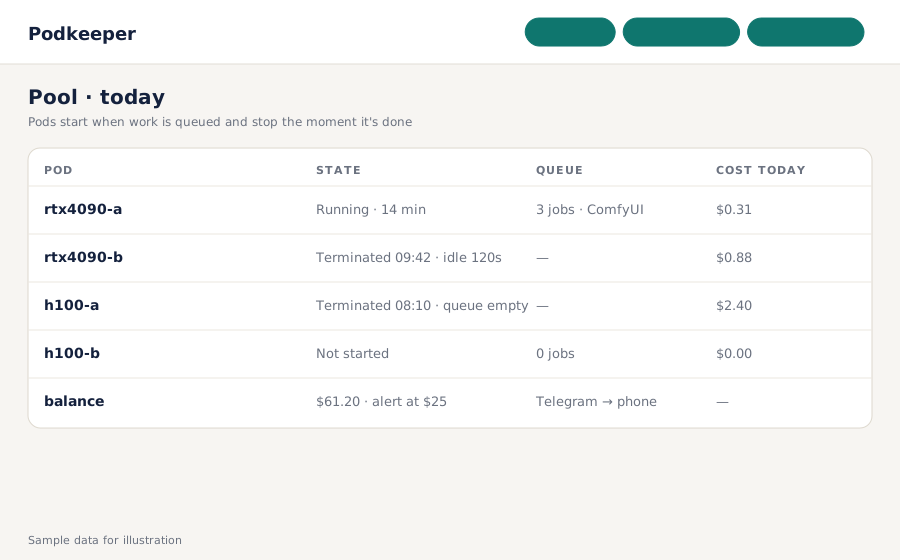
Launches a GPU pod when there's work, kills it when the queue empties, watches your balance, texts your phone. No more paying for a pod that sat idle all night.
Podkeeper is a small self-hosted daemon with a web panel that sits between your job queue and RunPod. When jobs are waiting it launches or adopts a pod from your template, waits for it to boot healthy, runs the work, and terminates the pod the moment the queue is empty for longer than your idle limit. It caps how many pods can exist at once, watches your RunPod balance and sends alerts to your phone. Sold by A2 Digital as a one-time purchase.
An H100 forgotten overnight is a car payment. Podkeeper terminates on an empty queue, every time, with a per-pod idle timer you set.
Queue a job and a pod comes up from your template within the normal RunPod boot time, health-checked before work is sent. Adopts a pod you started by hand, too.
Maximum pods, low-balance alert, template and GPU fallback when your first choice is sold out. Unattended, verified end to end.
Podkeeper watches a folder or an HTTP queue for jobs. The reference setup is ComfyUI; any job that can be expressed as a file or a POST works.
Your own API key, your pod template, GPU preference and fallbacks, maximum pod count, idle seconds. One config file.
Every 20 seconds: queued work with no pod → launch; pod healthy → dispatch; queue empty past idle limit → terminate. Balance checked on each tick.
Launch, terminate, low balance and boot failures go to Telegram. The panel shows the pool, costs today and what it saved you.
Prices in USD. Requires Python 3.10+ on any always-on machine (a $5 VPS, a home server, or the same box that runs your queue) and your own RunPod account and API key.
For some workloads. Serverless means a different packaging model, cold starts, and per-second pricing that isn't always cheaper for long ComfyUI jobs. Podkeeper keeps you on normal pods and templates you already have, and simply stops paying for idle time.
Out of the box: a folder of job files, or an HTTP endpoint that reports pending jobs. The reference adapter is ComfyUI's own queue. Other adapters are small Python classes; the guide shows one.
Anywhere Python runs, always on. A cheap VPS, a home server, or the machine that already hosts your queue. It needs outbound HTTPS to RunPod and Telegram, nothing inbound.
Yes, up to the maximum you set. It scales up when the queue is deep and back down as pods go idle.
Configure fallbacks in order (template and GPU type). Podkeeper tries them in sequence and tells you which one it got.
Only their existence and count. It never reads job contents or outputs.
One config file. Pods start when there's work and stop when there isn't.
Get Podkeeper