Clipmark · A2 Digital Products

From raw footage to a training set in an hour.

Mark the moments, tag the angle, export. Frame-accurate clips, consistent captions, a manifest your trainer reads, and a readiness check before you spend GPU time.
clipmark · dataset
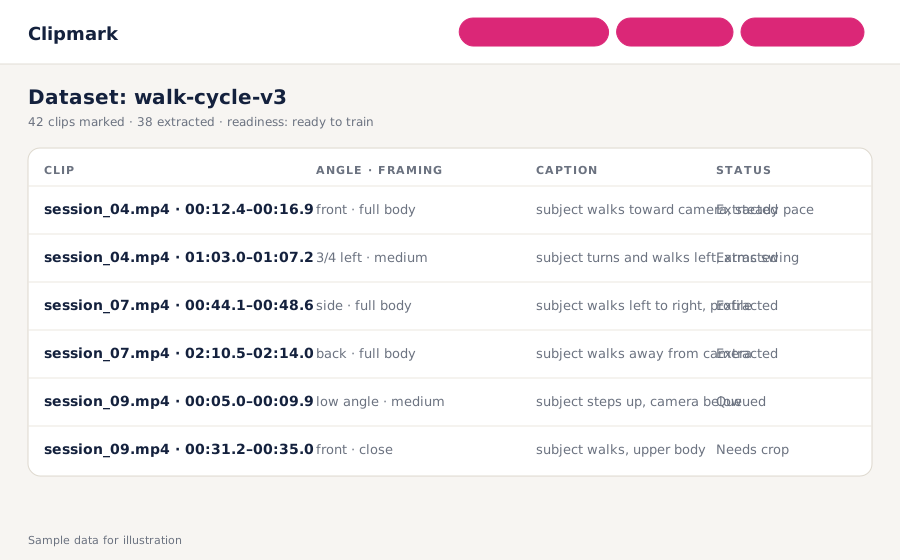
Clipmark dataset view: six marked clips with angle, framing, caption and extraction status, readiness shown as ready to train

Clipmark is a local desktop app for building motion LoRA datasets from your own videos. You scrub to a moment, mark a 3–6 second clip, pick camera angle and framing from fixed dropdowns, and Clipmark extracts frame-accurate mp4s with consistent captions and a manifest in the format Wan and Hunyuan trainers expect. A readiness check tells you whether the set has enough clips and variety before you rent a GPU. Sold by A2 Digital as a one-time download.

3–6s clip markingFixed angle vocabularyFrame-accurate ffmpegmusubi-tuner manifestReadiness checkRuns locally
Why trainers use it

Datasets are the bottleneck. Spreadsheets are not a tool.

Hours, not days

Hand-written ffmpeg commands and caption spreadsheets take a weekend per dataset. Marking in the player takes an hour, and the export does the rest.

Captions that agree with each other

Angle and framing come from dropdowns, so every caption uses the same words for the same thing. Consistency is what the LoRA learns.

Know before you train

Clip count, angle coverage and subject variety checked against thresholds you set. No more discovering a thin dataset after the pod bill.

How it works

Mark, tag, export, train

1

Open a folder of videos

Clipmark loads them in its player with a scrub strip. No upload, no cloud; everything stays on your machine.

2

Mark and tag clips

Set in and out points for a 3–6 second moment. Pick angle and framing from the vocabulary, add a short action phrase.

3

Export

Frame-accurate clips cut by ffmpeg at your chosen quality, one caption file per clip, a manifest in musubi-tuner format. Crop and re-extract individual clips as needed.

4

Check and push

Readiness report on count and variety. Pro adds one-click rsync to your GPU pod so training starts without a file-transfer step.

3–6s
clip length window enforced in the marker, matching what motion trainers expect.
1 vocabulary
for angle and framing, so captions never drift between sessions.
0 uploads
your footage never leaves your machine until you choose to push to your pod.
Pricing

One download, two tiers

Clipmark
$39one-time
Marker, vocabularies, ffmpeg extractor, captions, manifest, readiness check.
  • In-player clip marking with scrub strip
  • Angle and framing vocabularies (editable)
  • Frame-accurate extraction, quality presets
  • Caption files + musubi-tuner manifest
  • Readiness check with your thresholds
  • Re-extract and drop clips
  • 30 days email support
Get Clipmark
Clipmark Pro
$79one-time
Everything above, plus crop editor and one-click push to your GPU pod.
  • Crop editor per clip
  • rsync push to RunPod or any SSH host
  • Manifest regeneration after edits
  • Priority email support
Get Pro

Prices in USD. Windows, macOS and Linux. Requires ffmpeg (bundled on Windows and macOS). Optional updates $9/month.

Motion LoRA trainersAI video studiosCivitai and HuggingFace creatorsAnimation and VFX teams
Questions

What LoRA trainers ask first

Which trainers does it export for?

The manifest and caption layout follow musubi-tuner's dataset format, used for Wan 2.x motion LoRAs, and work for Hunyuan Video trainers with the same layout. Other layouts can be added as export profiles.

Can I change the angle and framing vocabulary?

Yes. Both lists are editable text files. The point is that everyone on a project uses the same one.

Does it train the LoRA?

No. It builds the dataset and, in Pro, pushes it to your pod. Training runs in your trainer of choice.

Is anything uploaded?

No. Clipmark runs locally. The only network action is the optional push to a pod you own.

What video formats work?

Anything ffmpeg can read, which is nearly everything. Output is mp4 at the fps and quality you set.

How many clips do I need?

It depends on the motion and the model; the readiness check uses thresholds you set (the defaults reflect common guidance for Wan motion LoRAs) and shows angle coverage so you can see gaps.

Stop hand-cutting training clips

Mark them in the player. Export a dataset your trainer can read.

Get Clipmark