Bridge · A2 Digital Products
Two clips. One shot. No cut.
Every generator gives you five-second clips that don't join. Bridge generates the two seconds between them from the frames you already have.
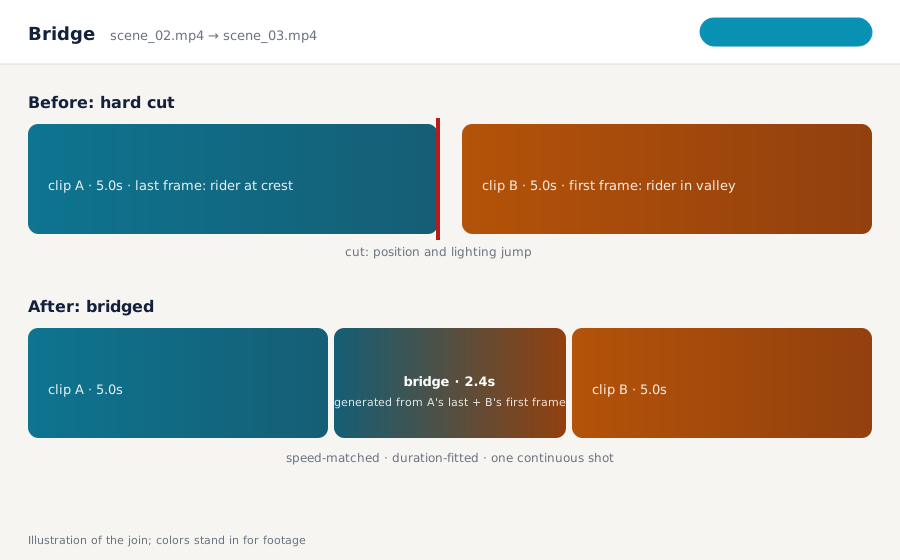
Every generator gives you five-second clips that don't join. Bridge generates the two seconds between them from the frames you already have.
Bridge is a ComfyUI workflow pack with a small local app that smooths the join between two AI-generated video clips. It takes the last frame of clip A and the first frame of clip B, generates a short bridging clip with a first/last-frame video model, matches duration and normalizes speed, and hands back a sequence that plays as one continuous shot. Works with clips from Kling, MiniMax, Runway, Wan, Sogni or anything else. Sold by A2 Digital as a one-time download; it runs on your own ComfyUI, local or on a pod you rent.
A crossfade blends two different motions and looks like one. A bridge is new motion that actually connects them, generated from the real end and start frames.
Point it at a folder of ordered clips. Every seam gets a bridge; the final sequence is assembled with the right timing. Hundreds of transitions have run through the reference pipeline.
A workflow JSON and a two-clip-in, one-clip-out app. Your ComfyUI, your GPU or your pod, no per-transition fee.
Import the pack into ComfyUI (local or on your pod). It uses a first/last-frame capable video model; the guide lists supported ones.
Choose clip A and clip B in the app, or a folder of ordered clips for a batch. Bridge extracts the boundary frames.
The model produces the connecting clip; Bridge fits its duration to the motion and normalizes speed across the seam.
Clips and bridges are concatenated in order with matched fps and resolution. Export, or feed the sequence to your editor.
Prices in USD. Requires ComfyUI with a first/last-frame capable video model (the guide names tested ones) on a GPU with enough memory for that model, locally or on a rented pod.
Yes. Bridge only needs the output video files. The boundary frames are extracted from them; the generator that made them doesn't matter.
ComfyUI, local or on a pod you rent, with a first/last-frame capable video model. You need a GPU with enough memory for that model.
Typically one to three seconds, fitted to the motion at the seam. You can set bounds.
As consistent as the two boundary frames make them. Bridge interpolates between what it's given; if A ends and B begins with the same subject, the bridge keeps it. It doesn't re-identify or face-swap.
Yes. Folder mode bridges every seam in order and assembles the full sequence with matched fps and resolution.
Some will, for their own clips. Bridge works across generators and across your existing library of clips, and runs on hardware you control.
A workflow pack and a small app. The seams disappear.
Get Bridge