Ads Copilot · A2 Digital Products
Google Ads automation that asks first.
Hourly proposals with the numbers behind them. Nothing changes until you tap approve. Spend can never exceed the caps you set.
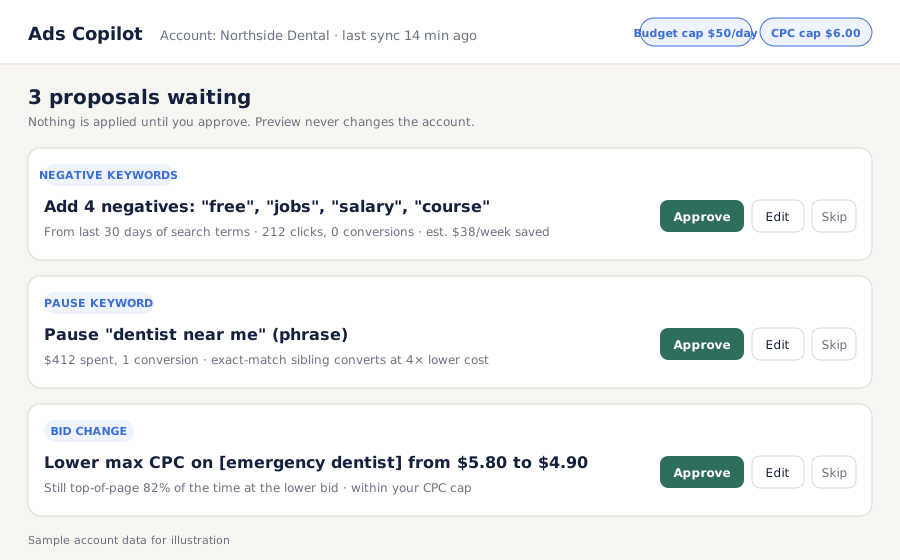
Hourly proposals with the numbers behind them. Nothing changes until you tap approve. Spend can never exceed the caps you set.
Ads Copilot is a Google Ads Script you install in your own account, paired with a small bridge you host, that reads performance every hour and proposes specific changes: negative keywords, pauses, bid and budget adjustments, each with the data behind it. It applies only what you approve, and never beyond the daily budget and cost-per-click ceilings you set. Sold by A2 Digital as a one-time purchase with optional updates.
Google's own auto-apply and most bid tools change things first and tell you later. Copilot shows the change, the data, and the estimated effect, and waits.
Daily budget ceiling and max CPC live in the script config, not in the AI. No proposal can exceed them, and nothing paused can be re-enabled by the tool.
Each proposal carries the search terms, spend, conversions and the comparison that justified it. Approving takes a glance; auditing takes one log.
Paste one Google Ads Script into your account under your own login, authorize it, set the budget and CPC caps. Ten minutes.
A small self-hosted service (one file, any cheap VPS or your existing server) receives the hourly snapshot and holds the proposal queue.
Negatives, pauses, bids and budget shifts arrive with their numbers. Approve, edit or skip each one from the queue page or a chat notification.
On the next hourly run the script applies only approved items, within caps, and writes every action to the change log.
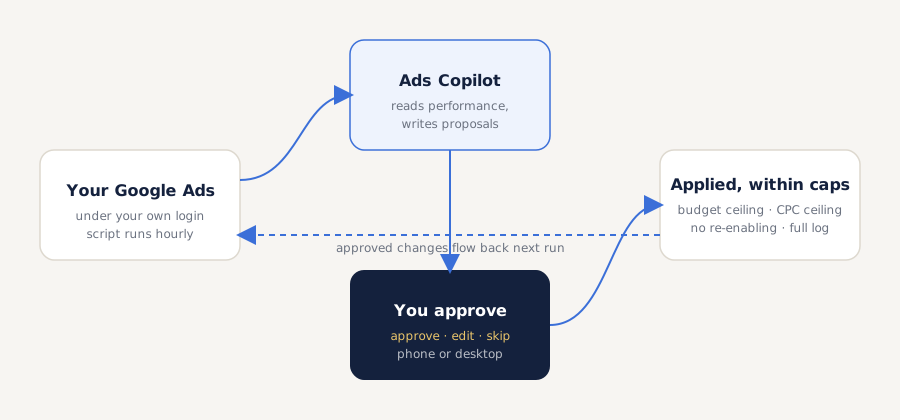
The script runs under your login, not ours. Copilot never holds your Google credentials; it only ever sees the hourly snapshot the script sends and the approvals you send back.
Four negatives from 30 days of search terms. A phrase-match term outspent by its exact sibling. A bid that can drop and keep its position. Each with the evidence, each waiting.
Prices in USD. Requires a Google Ads account you administer and a server to run the bridge (any $5/month VPS is enough). Agencies: one purchase covers all client accounts you manage.
No. The script runs inside your account under your own login. Copilot only receives the hourly performance snapshot the script sends and the approvals you send back. We never see your credentials and never log into your account.
Only what you approve, and only four kinds of change: add negative keywords, pause keywords or ads, adjust bids, and shift daily budget between campaigns. It cannot create campaigns, re-enable anything paused, or exceed the budget and CPC caps you set in the config.
Google's auto-apply makes the change first and reports it afterwards, and it is optimised for Google's goals. Copilot proposes first, shows the evidence, and waits. You can also use it to review Google's own recommendations before accepting any.
Yes. The bridge is multi-account from the start, so one install serves every client account you manage, each with its own caps and queue.
You need to paste a script into Google Ads and run one file on a server. The guide walks through both with screenshots. If you can set up a WordPress site you can set up Copilot.
Nothing changes in your account. The script keeps running in preview mode and resumes applying approved items when the bridge is back. It fails safe.
One script, one bridge, and every change waits for you.
Get Ads Copilot